¶ K8s Admission Controller — PodNodeSelector
Assign Namespace to dedicated work nodes
When you hosting a multi-tenant K8s cluster, you will definitely run into the use case that one namespace per client/team/customer. You would like to force clients to use specific worker nodes with a simple offering. So that one client’s Pods are running on client’s dedicated worker nodes.
You can achieve this by enable the PodNodeSelector plugin in K8s AdmissionController. This article shows you how.
What are Admission Controllers
In K8s, an admission controller is a plugin that intercepts requests to K8s api-server prior to persistence of the object. Admission controllers govern and enforce how K8s is used. They can be thought of as a gatekeeper that intercept (authenticated) API requests and may change the request object or deny the request altogether.
The admission controller has two phases:
- Mutating controller — It helps automate policy compliance processes, performed by a mutating web-hook interface and allows changing the object that is being admitted instead of rejecting it.
- Validating controller — It is responsible for gating the API requests and enforcing custom policies prior to request execution or persistence of the new object in the etcd.
For example, the LimitRanger admission controller can augment pods with default resource requests and limits (mutating phase), as well as verify that pods with explicitly set resource requirements do not exceed the per-namespace limits specified in the LimitRange object (validating phase). Like the following diagram shown:
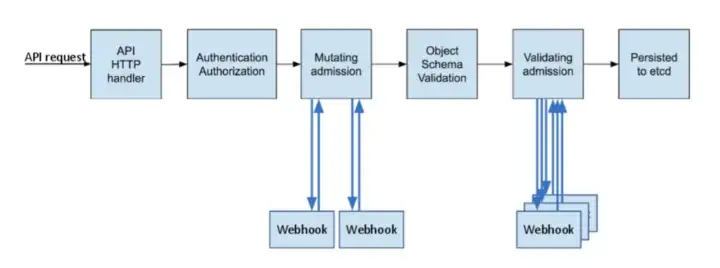
Note, The mutating step is performed prior to the validating step. Admission controllers that support mutation functionality may perform the mutation and validation in one step or still separate them and act as two independent capabilities.
Why Admission Controllers
Many advanced features in K8s require an admission controller to be enabled in order to properly support the feature. As a result, a K8s API server that is not properly configured with the right set of admission controllers is an incomplete server and will not support all the features you expect.
Admission Controllers provide the following benefits:
- Security: Admission controllers can increase security by mandating a reasonable security baseline across an entire namespace or cluster.
- Allow pulling images only from specific registries known to the enterprise, while denying unknown image registries.
- Reject deployments that do not meet security standards.
- Governance: Admission controllers allow you to enforce the adherence to certain practices such as having good labels, annotations, resource limits, or other settings.
- Enforce label validation on different objects to ensure proper labels are being used for various objects, such as every object being assigned to a team or project, or every deployment specifying an app label.
- Automatically add annotations to objects.
- Configuration management: Admission controllers allow you to validate the configuration of the objects running in the cluster and prevent any obvious misconfigurations from hitting your cluster.
- Automatically adding resource limits or validating resource limits
- Ensuing reasonable labels are added to pods
- Ensuring image references used in production deployments are not using the latest tags
¶ How to Enable Admission Controller
The K8s API server flag enable-admission-plugins takes a comma-delimited list of admission control plugins to invoke prior to modifying objects in the cluster. For example:
spec:
  containers:
  - command:
    - kube-apiserver
    - --advertise-address=10.230.40.12
    - --allow-privileged=true
    - --authorization-mode=Node,RBAC
    - --client-ca-file=/etc/kubernetes/pki/ca.crt
    - --enable-admission-plugins=NodeRestriction
The above example enables the NodeRestriction plugin.
¶ How to Disable Admission Controller
The K8s API server flag disable-admission-plugins takes a comma-delimited list of admission control plugins to be disabled, even if they are in the list of plugins enabled by default.
Assign Namespace to Certain Nodes
Okay, enough theory and let’s see how to assign namespace to certain nodes in your K8s cluster. My K8s cluster was built by kubeadm so I will use kubeadm as an example.
Existing K8s Cluster
If you have an existing K8s cluster created by kubeadm, first update your kubeadm-config.yml file:
apiVersion: kubeadm.k8s.io/v1beta3
bootstrapTokens:
- groups:
  - system:bootstrappers:kubeadm:default-node-token
  token: abcdef.0123456789abcdef
  ttl: 24h0m0s
  usages:
  - signing
  - authentication
kind: InitConfiguration
localAPIEndpoint:
  advertiseAddress: 10.230.40.12
  bindPort: 6443
nodeRegistration:
  criSocket: unix:///var/run/containerd/containerd.sock
  imagePullPolicy: IfNotPresent
  name: k8scplanev125-master.com
  taints: null
---
apiServer:
  timeoutForControlPlane: 4m0s
  extraArgs:
    enable-admission-plugins: NodeRestriction,PodNodeSelector
apiVersion: kubeadm.k8s.io/v1beta3
certificatesDir: /etc/kubernetes/pki
clusterName: kubernetes
controlPlaneEndpoint: k8scplanev125-master.com:6443
controllerManager: {}
dns: {}
etcd:
  local:
    dataDir: /var/lib/etcd
imageRepository: registry.k8s.io
kind: ClusterConfiguration
kubernetesVersion: 1.25.0
networking:
  dnsDomain: cluster.local
  podSubnet: 10.244.0.0/16
  serviceSubnet: 10.96.0.0/12
scheduler: {}
---
apiVersion: kubeproxy.config.k8s.io/v1alpha1
kind: KubeProxyConfiguration
mode: ipvs
Add the following args:
extraArgs:
    enable-admission-plugins: NodeRestriction,PodNodeSelector
to kubeadm-config.yml, then on each of the control plane node, run the following command:
$ kubeadm init phase control-plane apiserver --config /kubeadm-config.yml
The above command will terminate the current api-server pod and create new ones. Once you rebuild api-server pod on all control plane nodes, check each api-server pod that admission plugins are enabled:
$ kubectl get po kube-apiserver-node1 -n kube-system -oyaml | grep "enable-admission-plugins"
    - --enable-admission-plugins=NodeRestriction,PodNodeSelector
¶ New K8s cluster
For fresh K8s cluster it is straightforward, just add
extraArgs:
    enable-admission-plugins: NodeRestriction,PodNodeSelector
to kubeadm config YAML file and then run init command
$ kubeadm init --config /etc/k8s/kubeadm-config.yml
Annotate Namespace
Once you enabled admission plugin for NodeRestriction and PodNodeSelector, you can specify scheduler.alpha.kubernetes.io/node-selector option in annotations for your namespace:
apiVersion: v1
kind: Namespace
metadata:
 name: team-alpha
 annotations:
   scheduler.alpha.kubernetes.io/node-selector: team=team-alpha
spec: {}
status: {}
After the above step, all pods created in the team-alpha namespace will have the following sections automatically added:
nodeSelector:
    team: team-alpha
At this point, pods in team-alpha namespace will only be scheduled to run on node with team=team-alpha label.